

利用者・トーク:SGrabarczuk (WMF)/sandbox
話題追加Talk to the Community Tech
[編集]
Read this message in another language
こんにちは
We, the team working on the Community Wishlist Survey, would like to invite you to an online meeting with us. It will take place on 27 10月 (水曜日), 14:30 UTC on Zoom, and will last an hour. Click here to join.
Agenda
- Become a Community Wishlist Survey Ambassador. Help us spread the word about the CWS in your community.
- Update on the disambiguation and the real-time preview wishes
- Questions and answers
Format
The meeting will not be recorded or streamed. Notes without attribution will be taken and published on Meta-Wiki. The presentation (all points in the agenda except for the questions and answers) will be given in English.
We can answer questions asked in English, French, Polish, and Spanish. If you would like to ask questions in advance, add them on the Community Wishlist Survey talk page or send to sgrabarczuk@wikimedia.org.
Natalia Rodriguez (the Community Tech manager) will be hosting this meeting.
Invitation link
- Join online
- Meeting ID: 83847343544
- Dial by your location
We hope to see you! SGrabarczuk (WMF) (talk) 2021年10月21日 (木) 12:32 (UTC)
Talk to the Community Tech
[編集]Read this message in another language
こんにちは
We, the team working on the Community Wishlist Survey, would like to invite you to an online meeting with us. It will take place on 27 10月 (水曜日), 14:30 UTC on Zoom, and will last an hour. Click here to join.
Agenda
- Become a Community Wishlist Survey Ambassador. Help us spread the word about the CWS in your community.
- Update on the disambiguation and the real-time preview wishes
- Questions and answers
Format
The meeting will not be recorded or streamed. Notes without attribution will be taken and published on Meta-Wiki. The presentation (all points in the agenda except for the questions and answers) will be given in English.
We can answer questions asked in English, French, Polish, Spanish, German, and Italian. If you would like to ask questions in advance, add them on the Community Wishlist Survey talk page or send to sgrabarczuk@wikimedia.org.
Natalia Rodriguez (the Community Tech manager) will be hosting this meeting.
Invitation link
- Join online
- Meeting ID: 83847343544
- Dial by your location
We hope to see you! SGrabarczuk (WMF) (talk) 2021年10月22日 (金) 22:43 (UTC)
Talk to the Community Tech
[編集]Hello!
We, the team working on the Community Wishlist Survey, would like to invite you to an online meeting with us. It will take place on 30 11月 (火曜日), 17:00 UTC on Zoom, and will last an hour. Click here to join.
Agenda
- Changes to the Community Wishlist Survey 2022. Help us decide.
- Become a Community Wishlist Survey Ambassador. Help us spread the word about the CWS in your community.
- Questions and answers
Format
The meeting will not be recorded or streamed. Notes without attribution will be taken and published on Meta-Wiki. The presentation (all points in the agenda except for the questions and answers) will be given in English.
We can answer questions asked in English, French, Polish, Spanish, German, and Italian. If you would like to ask questions in advance, add them on the Community Wishlist Survey talk page or send to sgrabarczuk@wikimedia.org.
Natalia Rodriguez (the Community Tech manager) will be hosting this meeting.
Invitation link
- Join online
- Meeting ID: 82035401393
- Dial by your location
We hope to see you! SGrabarczuk (WMF) (talk) 2021年11月26日 (金) 19:59 (UTC)
Community Wishlist Survey 2022 is coming. Help us!
[編集]The Community Wishlist Survey 2022 starts in less than two weeks (Monday 10 January 2022, 18:00 UTC). We, the team organizing the Survey, need your help.
Only you can make the difference
How many people will hear and read about the Survey in their language? How many will decide to participate? Will there be enough of you to vote for a change you would like to see? It all depends on you, volunteers.
Why are we asking?
- We have improved the documentation. It's easier to use and less textual. This will be for nothing if the new documentation will only be in English.
- Thousands of volunteers haven't participated in the Survey yet. We'd like to improve that, too. Three years ago, 1387 people participated. Last year, there were 1773 of them. We hope that in the upcoming edition, there will be even more. You are better than us in contacting Wikimedians outside of wikis. We have prepared some images to share. More to come.
What is the Community Wishlist Survey?

It's an annual survey that allows contributors to the Wikimedia projects to propose and vote for tools and platform improvements. Long years of experience in editing or technical skills are not required.
Thanks, and be safe and successful in 2022! SGrabarczuk (WMF) (talk) 2021年12月29日 (水) 03:07 (UTC)
Feedback on Vector (2022) conversation
[編集]
Hello! As a member of WikiProject Usability, I wanted to draw your attention to a conversation currently underway on WP:VPR (see the beginning of the discussion) around adopting Vector 2022 as the new default skin.
The Web team at the Wikimedia Foundation has been working on Vector 2022 for the past three years, collaborating with the English Wikipedia community as well as other wikis to ensure that the skin performs better qualitatively and quantitatively for readers and communities than the previous Vector skin. The goal of the new skin is to create a more welcoming and easier to use experience for readers and editors across the wiki. For more details, see our new FAQ.
For the past couple of months, we have collected thoughts from the English Wikipedia community on what changes need to be made to the skin prior to it being considered ready for deployment. Our next step would be to start an RfC to assess whether the community considers Vedtor 2022 ready.
Prior to the beginning of the RfC, we wanted to draw your attention to the current conversation and encourage your feedback on the skin.
Thank you, OVasileva (WMF), SGrabarczuk (WMF) (talk) 2022年8月25日 (木) 12:25 (UTC)
The Vector 2022 skin as the default in two weeks?
[編集]
Hello. I'm writing on behalf of the Wikimedia Foundation Web team. In two weeks, we would like to make the Vector 2022 skin the default on this wiki.
We have been working on it for the past three years. So far, it has been the default on more than 30 wikis, including sister projects, all accounting for more than 1 billion pageviews per month. On average 87% of active logged-in users of those wikis use Vector 2022.
It would become the default for all logged-out users, and also all logged-in users who currently use Vector legacy. Logged-in users can at any time switch to any other skins. No changes are expected for users of these skins.
- Top of an article
-
 Vector legacy (current default)
 -
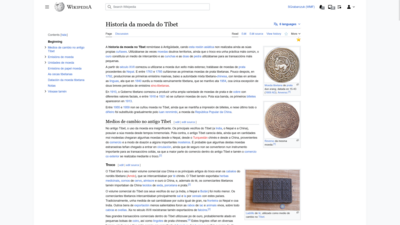 Vector 2022


- A section of an article
-
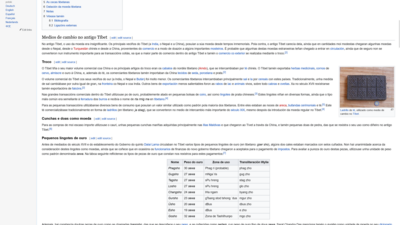 Vector legacy (current default)
 -
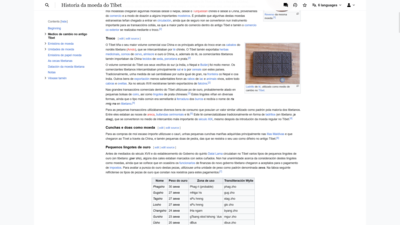 Vector 2022

About the skin
[編集][Why is a change necessary] The current default skin meets the needs of the readers and editors as these were 13 years ago. Since then, new users have begun using Wikimedia projects. The old Vector doesn't meet their needs.
[Objective] The objective for the new skin is to make the interface more welcoming and comfortable for readers and useful for advanced users. It draws inspiration from previous requests, the Community Wishlist Surveys, and gadgets and scripts. The work helped our code follow the standards and improve all other skins. We reduced PHP code in Wikimedia deployed skins by 75%. The project has also focused on making it easier to support gadgets and use APIs.
[Changes and test results] The skin introduces a series of changes that improve readability and usability. The new skin does not remove any functionality currently available on the Vector skin.
- The sticky header makes it easier to find tools that editors use often. It decreases scrolling to the top of the page by 16%.
- The new table of contents makes it easier to navigate to different sections. Readers and editors jumped to different sections of the page 50% more than with the old table of contents. It also looks a bit different on talk pages.
- The new search bar is easier to find and makes it easier to find the correct search result from the list. This increased the amount of searches started by 30% on the wikis we tested on.
- The skin does not negatively affect pageviews, edit rates, or account creation. There is evidence of increases in pageviews and account creation across partner communities.
[Try it out] Try out the new skin by going to the appearance tab in your preferences and selecting Vector 2022 from the list of skins.
How can editors change and customize this skin?
[編集]It's possible to configure and personalize our changes. We support volunteers who create new gadgets and user scripts. Check out our repository for a list of currently available customizations, or add your own.
Our plan
[編集]If no large concerns are raised, we plan on deploying in the week of October 3, 2022. If your community would like to request more time to discuss the changes, hit the button and write to us. We can adjust the calendar.
Also, if you'd like ask our team anything, if you have questions, concerns, or additional thoughts, please ping me here or write on the talk page of the project. We will also gladly answer! See our FAQ. Thank you! SGrabarczuk (WMF) (talk) 2022年9月22日 (木) 04:05 (UTC)
Update on Vector 2022
[編集]
Hey everyone. I'm sorry for not communicating in your language. I'm writing on behalf of the Web team working on the new skin, Vector 2022.
We wanted to apologize for the delays in the deployment of Vector 2022. We know many of you are waiting for this eagerly. We have been delaying the deployment because we have been working on the logos. It has taken us more time than originally expected. Once the logos are ready, we will let you know the exact date of deployment. We are planning for either the next (more likely) or the following week. If your wiki doesn't currently have a localized logo, we encourage you to reach out to us and we can help make one.
We invite you to get involved in the project. Contact us if you have any questions or need any help, particularly with the compatibility of gadgets and user scripts. SGrabarczuk (WMF) (talk) 2022年10月19日 (水) 23:14 (UTC)
Desktop improvements. A new change is coming!
[編集]
(こんにちは! 邦訳にご協力ください)
Next week (the week of February 6), the Wikimedia Foundation Web team will move some links from the side menu ("sidebar") to the other side of the screen.
This will make it easier to intuitively use all the links and tools within our interface. The table of contents will also appear a bit higher up the screen because the sidebar will be shorter. The latter change would mostly be interesting for editors. This is because readers use the sidebar much more rarely.
Why we are changing this
The interface does not distinguish between the links and tools that are relevant to the website and the links and tools that are relevant to a single page. Main page, random page, recent changes, are in the first group. What links here, related changes, cite this page, belong to the second one. This mix is confusing to new readers. Also new editors are not familiar with what each link does. Mixing these groups makes it less likely for people to explore these tools naturally.
This change also addresses the concern for the location of the table of contents. Previously, some editors using an earlier version of Vector 2022 told us that because the table of contents appeared below the sidebar, it was placed too much down below the page. After this change, the sidebar will be shorter and thus will shift the table of contents further up in the page. Also, this change will reduce the white space on the page by using more of the space for the display of tools.
You can learn more about the page tools feature and the Desktop Improvements project on MediaWiki.org.
Gadgets' compatibility
Technically skilled editors may need to update some gadgets and user scripts. Some of these might become redundant or obsolete. We provide support for users who would like to maintain the compatibility. Please explore this section of our documentation for more information on gadget compatibility.
Let's work together
- Subscribe to our newsletter to receive regular updates.
- Share your ideas and ask questions on our talk page.
- Create a task on Phabricator and add
Desktop Improvements (Vector 2022)tag or write to us if you notice a bug. - Translate the documentation on MediaWiki.org.
ありがとうございます! SGrabarczuk (WMF) (トーク) 2023年2月3日 (金) 20:47 (UTC)
Tech/Server switch
[編集]MediaWiki message delivery 2023年4月21日 (金) 00:03 (UTC)
未登録の編集者の臨時アカウント
[編集]あなたの言語で読む • 邦訳にご協力ください • これらの変更について他の利用者に伝えてください

2024年に、アカウントを登録していない編集者で、自動的に臨時アカウントの使用が始まります。 これらの編集者は、その IP アドレスがページ履歴に表示されているため、「IP 編集者」と呼ばれることがあります。
信頼性と安全性製品チームは、この変更に関してウィキマニアでプレゼンテーションを行いました。 YouTube で視聴できます。
詳細情報はm:IP編集:プライバシー保護と荒らし行為軽減にあります。
SGrabarczuk (WMF) (トーク) 2023年9月30日 (土) 01:56 (UTC)
The Vector 2022 skin as the default in two weeks?
[編集]Read this in your language • 邦訳にご協力ください • Please tell other users about these changes
Hello. I'm writing on behalf of the Wikimedia Foundation Web team. In two weeks, we would like to make the Vector 2022 skin the default on this wiki.

If you prefer keeping the current skin select "Vector legacy (2010)" on the appearance tab of the global preferences and save the change. We encourage you to give the new skin a try, though.
Since I last came to you with this question, many things have changed. The skin is now the default on most Wikipedias, and all logos are done! We have also made some tweaks in the skin itself. Below is the text I've sent to you once, but I'm sending it again, just slightly edited, for those who haven't seen it.
If you know what this is about, jump straight to the section "Our plan":
It would become the default for all logged-out users, and also all logged-in users who currently use Vector legacy as a local (but not global) preference. Logged-in users can at any time switch to any other skin. No changes are expected for these skins.
- Top of an article
-
 Vector legacy (current default)
 -
 Vector 2022
- A section of an article
-
 Vector legacy (current default)
 -
 Vector 2022
About the skin
[編集][Why is a change necessary] When the current default skin was created, it reflected the needs of the readers and editors as these were 14 years ago. Since then, new users have begun using the Internet and Wikimedia projects in different ways. The old Vector does not meet their needs.
[Objective] The objective for the Vector 2022 skin is to make the interface more welcoming and comfortable for readers and useful for advanced users. It introduces a series of changes that aim to improve problems new and existing readers and editors were having with the old skin. It draws inspiration from previous user requests, the Community Wishlist Surveys, and gadgets and scripts. The work helped our code follow the standards and improve all other skins. The PHP code in the other available skins has been reduced by 75%. The project has also focused on making it easier to support gadgets and use APIs.

[Changes in a nutshell] The skin introduces changes that improve readability and usability. The new skin does not remove any functionality currently available on the Vector skin.
- The limited width and pin-able menus allow to adjust the interface to the screen size, and focus on editing or reading. Logged-in and logged-out users may use a toggle button to keep the full width, though.
- The sticky header makes it easier to find tools that editors use often. It decreases scrolling to the top of the page by 16%.
- The new table of contents makes it easier to navigate to different sections. Readers and editors jump to different sections of the page 50% more than with the old table of contents. It also looks a bit different on talk pages.
- The new search bar is easier to find and makes it easier to find the correct search result from the list. This increased the amount of searches started by 30% on the tested wikis.
- The skin does not negatively affect pageviews, edit rates, or account creation. There is evidence of increases in pageviews and account creation across partner communities.
[Customize this skin] It's possible to configure and personalize our changes. We support volunteers who create new gadgets and user scripts. Check out the repository for a list of currently available customizations and changes, or add your own.
Our plan
[編集]If no large concerns are raised, we plan on deploying on 31 October. If you'd like to ask our team anything, if you have questions, concerns, or additional thoughts, please comment in any language. If this is the first comment to my message, make sure to ping me. We will gladly answer! Also, check out our FAQ. Thank you!
The Vector 2022 skin as the default in three weeks?
[編集]Read this in your language • 邦訳にご協力ください • Please tell other users about these changes
Hello. I'm writing on behalf of the Wikimedia Foundation Web team. In two weeks, we would like to make the Vector 2022 skin the default on this wiki.
If you prefer keeping the current skin select "Vector legacy (2010)" on the appearance tab of the global preferences and save the change. We encourage you to give the new skin a try, though.
Since I last came to you with this question, many things have changed. The skin is now the default on most Wikipedias, and all logos are done! We have also made some tweaks in the skin itself. Below is the text I've sent to you once, but I'm sending it again, just slightly edited, for those who haven't seen it.
If you know what this is about, jump straight to the section "Our plan":
It would become the default for all logged-out users, and also all logged-in users who currently use Vector legacy as a local (but not global) preference. Logged-in users can at any time switch to any other skin. No changes are expected for these skins.
- Top of an article
-
Vector legacy (current default)
-
Vector 2022
- A section of an article
-
Vector legacy (current default)
-
Vector 2022
About the skin
[編集][Why is a change necessary] When the current default skin was created, it reflected the needs of the readers and editors as these were 14 years ago. Since then, new users have begun using the Internet and Wikimedia projects in different ways. The old Vector does not meet their needs.
[Objective] The objective for the Vector 2022 skin is to make the interface more welcoming and comfortable for readers and useful for advanced users. It introduces a series of changes that aim to improve problems new and existing readers and editors were having with the old skin. It draws inspiration from previous user requests, the Community Wishlist Surveys, and gadgets and scripts. The work helped our code follow the standards and improve all other skins. The PHP code in the other available skins has been reduced by 75%. The project has also focused on making it easier to support gadgets and use APIs.
[Changes in a nutshell] The skin introduces changes that improve readability and usability. The new skin does not remove any functionality currently available on the Vector skin.
- The limited width and pin-able menus allow to adjust the interface to the screen size, and focus on editing or reading. Logged-in and logged-out users may use a toggle button to keep the full width, though.
- The sticky header makes it easier to find tools that editors use often. It decreases scrolling to the top of the page by 16%.
- The new table of contents makes it easier to navigate to different sections. Readers and editors jump to different sections of the page 50% more than with the old table of contents. It also looks a bit different on talk pages.
- The new search bar is easier to find and makes it easier to find the correct search result from the list. This increased the amount of searches started by 30% on the tested wikis.
- The skin does not negatively affect pageviews, edit rates, or account creation. There is evidence of increases in pageviews and account creation across partner communities.
[Customize this skin] It's possible to configure and personalize our changes. We support volunteers who create new gadgets and user scripts. Check out the repository for a list of currently available customizations and changes, or add your own.
Our plan
[編集]If no large concerns are raised, we plan on deploying on 14 November. If you'd like to ask our team anything, if you have questions, concerns, or additional thoughts, please comment in any language. If this is the first comment to my message, make sure to ping me. We will gladly answer! Also, check out our FAQ. Thank you! SGrabarczuk (WMF) (トーク) 2023年10月26日 (木) 01:07 (UTC)